Free edition (MT4)
For checking settings and behavior in backtests and demo accounts.
Download the free editionMetaTrader 4 | Close-Only EA
When free margin drops below your chosen threshold, RunFromLosscut automatically closes positions starting with the smallest loss. This MT4 EA helps you manage margin levels and may help avoid a broker-enforced liquidation of all open positions.
The free edition is available for backtesting and demo accounts. The MT4 edition is required for live-account use.
Depending on a broker’s rules, a drop in the margin maintenance ratio may trigger the forced liquidation of every open position.
Sometimes, closing just one or two positions may be enough to restore the margin level. If the market then recovers, you might have preferred to keep some positions open—but a broker-enforced stop-out can close them all at once.
Instead of waiting for every position to be liquidated, set rules to reduce exposure selectively.
RunFromLosscut monitors free margin in MT4. When it falls below your activation threshold, the EA starts closing positions in profit-and-loss order and continues until free margin rises above your recovery target.
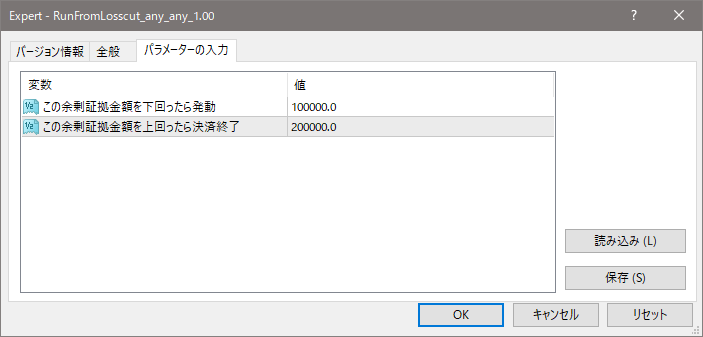
Choose the free-margin amount below which the EA should start closing positions.
The EA closes positions by market order, starting with positions that have the highest profit or the smallest loss.
The EA stops closing positions once free margin rises above your specified target.
Define the levels in advance, and automate your response when free margin falls.
When markets move quickly, deciding which positions to close can be stressful. RunFromLosscut helps you respond according to free-margin thresholds you set in advance.
Start automatic position closing when free margin falls below your chosen amount.
Positions with the highest profit or the smallest loss are closed first, helping reduce the need to select positions manually.
Set a free-margin recovery target. Position closing ends when free margin rises above that amount.
Check the parameters and closing sequence in a backtest or demo account before deciding whether to use the EA.
Specify the free-margin level that triggers position closing and the level at which the EA should stop.
See when position closing starts and which positions are selected. Begin with a backtest or demo account to check the EA in your MT4 environment.
The free edition is available for backtesting and demo accounts. Check the parameters and closing behavior in your own MT4 setup before considering live-account use.
Select the edition that fits your next step—from checking the EA in a backtest to considering use on a live MT4 account.
For checking settings and behavior in backtests and demo accounts.
Download the free editionFor those considering use on a live MT4 account.
View the MT4 editionCheck each GogoJungle product page for the latest features and license terms.
Choose your activation threshold and free-margin recovery target, then try the free edition in a backtest or demo account.
The free edition is available for backtesting and demo accounts. The MT4 edition is required for live-account use.