
[MT4] (Close-Only) Stop-Out Prevention EA [RunFromLosscut]
When free margin falls below a user-defined threshold, this EA automatically closes open positions, starting with those with the smallest losses, until free margin rises above the user-defined target level. This helps reduce the risk of margin calls and broker-enforced stop-outs.
👉️Download here. Please try it out!
When Is This EA Useful? → When You Want to Avoid Forced Liquidation of All Open Positions
Some FX brokers in Japan may forcibly liquidate all open positions when the margin maintenance ratio falls below 100%, depending on their rules.
However, there may be situations where closing just one or two positions would be enough to bring the margin maintenance ratio back above 100%. In other cases, the market may recover shortly afterward, potentially allowing positions to return to profit if they had not been closed at a loss. Nevertheless, a broker-enforced liquidation may close all positions before that recovery occurs.
This EA is designed to help manage margin levels in such situations by closing positions selectively rather than waiting for a broker-enforced stop-out.
Features of Stop-Out Prevention EA [RunFromLosscut]
When free margin falls below a user-defined threshold, the EA begins closing open positions, starting with those with the smallest losses. It continues until free margin rises above the specified target level. This helps reduce the risk of an unexpected forced liquidation of all open positions.
Activation threshold: The EA activates when free margin falls below the specified amount. (Configure this using the parameter “この余剰証拠金額を下回ったら発動”. The value is specified in the account currency.)
Recovery target: The EA stops closing positions once free margin rises above the specified amount. (Configure this using the parameter “この余剰証拠金額を上回ったら決済終了”. The value is also specified in the account currency.)
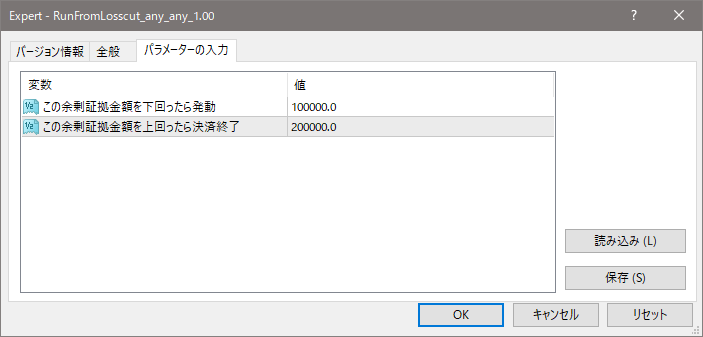
※ The EA does not consider magic numbers or similar factors. It purely closes positions in the order of the highest profit or the lowest loss.
※ When the market fluctuates sharply or the spread widens significantly, the loss-cut avoidance may not be completed in time or the order may not be executed. Also, even if all positions are closed, there is a possibility that the free margin still does not recover, in which case the situation may become the same as a stop-out by the FX company. The author assumes no responsibility for any losses or damages caused by using this software. Please use it at your own risk. Before using it on a real account, please test it on a demo account first.
Download
MT4 version and free version are available. Here is a list of what you can do and where to download them.
| What you can do | MT4 version | Free version (MT4) |
|---|---|---|
| Run a backtest | ✅️ | ✅️ |
| Run on a demo account | ✅️ | ✅️ |
| Run on a live account | ✅️ | - |
👉️Download MT4 version ⇒ GogoJungle
👉️Download Free version (MT4) ⇒ GogoJungle
⇒ Please try the free version before buying if you want to check performance in advance.